DIY Smart Home vs Professional Installation in Gig Harbor: What You Actually Get (and What It Costs)

Ivan Rivas • January 3, 2026

DIY Smart Home vs Professional Installation in Gig Harbor: What You Actually Get (and What It Costs)

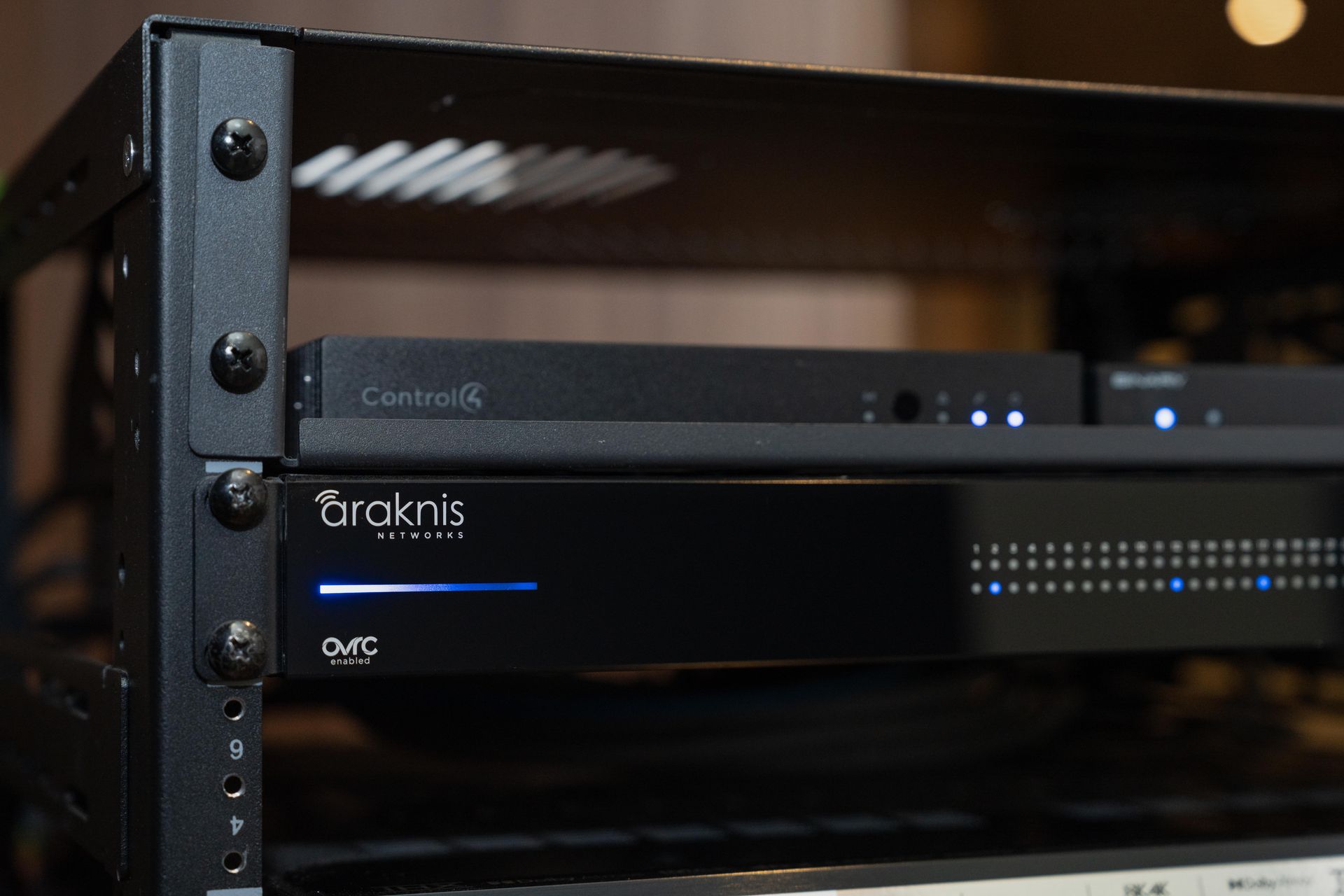
Close-up of a smart home network rack with an Araknis router and Control4 equipment for reliable home automation in Gig Harbor.


If you’re a homeowner in Gig Harbor researching smart home upgrades, you’ll run into the same decision almost everyone faces:

Do I build this myself… or hire a professional?


DIY smart home gear is easier to buy than ever — but the real question is whether it will work reliably, integrate cleanly, and still make sense when you add cameras, lighting control, audio, or a security system later.


In this guide, we’ll break down what you actually get with DIY versus professional smart home installation in Gig Harbor — including real-world reliability, total cost, and what most homeowners wish they knew before they started.

The Real Difference Isn’t Technology — It’s Engineering

Most smart home products can “work” on day one.


The real difference between DIY and a professional smart home installation comes down to what happens after:

  • your house adds more devices
  • Wi-Fi gets congested
  • cameras start buffering
  • music drops out
  • apps stop talking to each other
  • family members get frustrated
  • or you remodel and want the system to scale


A professionally designed system is built like a foundation — it’s planned to support your home’s technology for years, not just for the next gadget you buy.

DIY Smart Home Installation in Gig Harbor (What It’s Great For)

DIY smart home installs can be a good option if:

  • you’re starting small
  • you’re comfortable troubleshooting
  • you don’t mind managing multiple apps
  • your needs are simple and unlikely to grow


DIY is often best for:

  • a few smart switches
  • one doorbell camera
  • a couple streaming devices
  • basic voice control
  • single-room audio


For many homeowners, DIY feels like a great value early on — until the system grows beyond what the network and devices can support.

The Most Common DIY Problems (And Why They Happen)

Here’s what we see most often when homeowners go the DIY route first and later call a professional:


1) Wi-Fi becomes the bottleneck

Most DIY smart home issues aren’t the product’s fault — they’re a network problem.
As soon as you add:

  • cameras
  • smart TVs
  • multi-room audio
  • video doorbells
  • smart lighting
  • phones/tablets
  • and guests

…the home network becomes the weak link.


2) Too many apps, too little control

DIY systems often rely on separate apps for:

  • lights
  • cameras
  • audio
  • thermostat
  • door locks
  • scenes
  • and automation

That can work for one person in the home — but it usually becomes frustrating for everyone else.


3) Integration breaks when systems expand

DIY systems are rarely planned as an ecosystem.

So when you try to add:

  • motorized shades
  • lighting scenes
  • whole-home audio
  • or structured security

…you hit compatibility issues or end up rebuilding everything.


4) It works… until it doesn’t

DIY often means:

  • firmware updates
  • device dropouts
  • rebooting equipment
  • inconsistent automations


The time cost builds up quickly.

Professional Smart Home Installation in Gig Harbor (What You’re Actually Paying For)

When you hire a professional smart home integrator, you are not paying for “devices.”


You’re paying for a system that is:

  • engineered to work reliably
  • easy for the household to use
  • expandable over time
  • supported locally when issues come up


Professional installation usually includes:


1) Network and infrastructure built correctly

A smart home is only as good as the infrastructure supporting it.

A professional system starts with:

  • proper network design
  • wired access points where needed
  • clean rack/closet organization
  • stable switching and power
  • reliable remote management


2) Unified control (Control4 and AVA)

Instead of multiple apps, professional systems can give you:

  • one interface
  • simple scenes
  • easy control for everyone
  • consistent automation


3) Clean installation and long-term service

Your system is installed cleanly, tested thoroughly, and supported over time.
That includes:

  • troubleshooting
  • expansions
  • upgrades
  • and service support


For many Gig Harbor homeowners, the value is not just convenience — it’s reducing frustration and protecting the investment long-term.

DIY vs Professional — Cost Comparison (The Honest Truth)

This is the part homeowners care about most, and the honest answer is:


✅ DIY is cheaper upfront
✅ Professional is lower risk long-term


DIY costs tend to increase when:

  • devices don’t work well together
  • you replace gear multiple times
  • you spend money on “fixes”
  • Wi-Fi upgrades happen after problems appear
  • or you re-buy products to unify control later


Professional installs typically cost more because:

  • systems are designed as a whole
  • networking is engineered properly
  • automation is programmed
  • and the installation is clean, scalable, and supported

How to Decide What’s Right for Your Gig Harbor Home

Here’s a quick rule of thumb:


DIY makes sense if:

  • you only want a few smart upgrades
  • you’re comfortable troubleshooting
  • you don’t mind separate apps
  • you don’t expect to scale much


Professional installation makes sense if:

  • you want reliability
  • you want unified control
  • you’re adding security cameras
  • you want lighting scenes
  • you care about clean installation
  • you want whole-home Wi-Fi done right
  • you want a system that grows with your home

Get a Smart Home Price Range for Your Gig Harbor Home

If you want clarity on cost before scheduling a walkthrough, start with our Online Estimator.


It takes a few minutes and provides a realistic price range based on:

  • your home
  • your priorities
  • and the systems you’re considering


Why Gig Harbor Homeowners Choose Rivas Technology Group

Rivas Technology Group designs and installs smart home and security systems across Gig Harbor and the South Sound. Our focus is building systems that are:

  • reliable
  • easy to use
  • professionally installed
  • and engineered for long-term performance


Whether you want a small upgrade or a full smart home, we’ll help you build a system that fits your home and your lifestyle.

If you’re deciding between DIY and professional smart home installation in Gig Harbor, the best next step is getting clarity on scope and budget.


Use our Online Estimator to understand your options, or contact our team to schedule a walkthrough and custom design consultation.

Contact Us

By Ivan Rivas March 23, 2026
Homeowners reviewing notes and planning a smart home project at a table with paperwork and a laptop.
By Ivan Rivas December 17, 2025
Wondering what smart home installation costs in Tacoma? Learn how online estimators work, what affects pricing, and how to get an accurate estimate for your home.
Luxury Tacoma living room with integrated smart home lighting, audio, and wall-mounted control syste
By Ivan Rivas December 16, 2025
Learn the most common smart home problems Tacoma homeowners regret — from weak Wi-Fi to poor integration — and how professional design prevents them.
Modern Tacoma living room with a sectional sofa, round coffee table, and floating wood staircase in
By Ivan Rivas December 10, 2025
Looking for smart home installation in Tacoma? Learn real cost ranges, what a professional install includes, and how RTG designs reliable Control4 and AVA smart homes.
Show More